
 Chloe
chloedb-sheets: spreadsheets in ChloeDB
Reference, rendered from docs/chloedb/sheets.md.
These docs follow main, which can be ahead of the latest release, 0.3.11 (its docs): a change made after it says so where it is described.
On this page
chloedb-sheets is a spreadsheet app that keeps its workbooks in ChloeDB. A workbook has the things you expect of one: sheets, formulas (IronCalc's engine, over 300 of Excel's functions, array formulas and spills), number formats, fonts, colors, borders, merged cells, frozen panes, conditional formats, named ranges, sorting, filters, find and replace, charts and pivot tables. It also has what a spreadsheet kept in a database can have:
- Every cell is a row of a ChloeDB table, so every workbook can be searched at once (BM25 over the cells' text), and a workbook opened in two windows shows what the other changed.
- The cluster's tables open as sheets, live: rows paged in as you scroll (past the server's result window, by the sort's key: the key's column or a number, time or boolean column, so a table of any size is read to its end), sorted by any column, filtered with a SQL
WHEREand searched withMATCH, and edited in place (each change is a write to the table). - Cells can be filled by SQL: a query of the cluster's tables writes its answer into a sheet from a cell on, is kept with the workbook, and runs again when you refresh it, so the cells (and the formulas and charts over them) follow the table.
- A sheet becomes a table: its first row names the columns, each column gets the type its cells hold, and its rows are written to ChloeDB by a key you choose.
- Files come in and go out: Excel workbooks (.xlsx, formulas and formats kept), CSV and TSV, and SQLite databases, whose tables become sheets of a workbook or tables of the cluster; a workbook goes out as .xlsx, a sheet as CSV.
Like the crawler, it is a program of its own, in Rust, that talks to chloedb-server over HTTP only, and the command center shows it as an app.
Run it#
Install both programs, then start chloedb-sheets with a cluster of its own. since 0.3.2 The installer puts both in ~/.local/bin prebuilt, and chloedb-sheets finds the server beside it:
curl -fsSL https://chloetech-ai.github.io/chloedb/install.sh | sh -s -- --with sheets
~/.local/bin/chloedb-sheets serve --local ./sheets-cluster
Or build both from a checkout (any platform with Rust; the only way before release 0.3.2):
(cd chloedb-server && cargo build --release --bin chloedb-server)
cd chloedb-sheets && cargo build --release
target/release/chloedb-sheets serve --local ./sheets-cluster --server-bin ../chloedb-server/target/release/chloedb-server
Open http://127.0.0.1:7700 and go to Apps → Sheets.
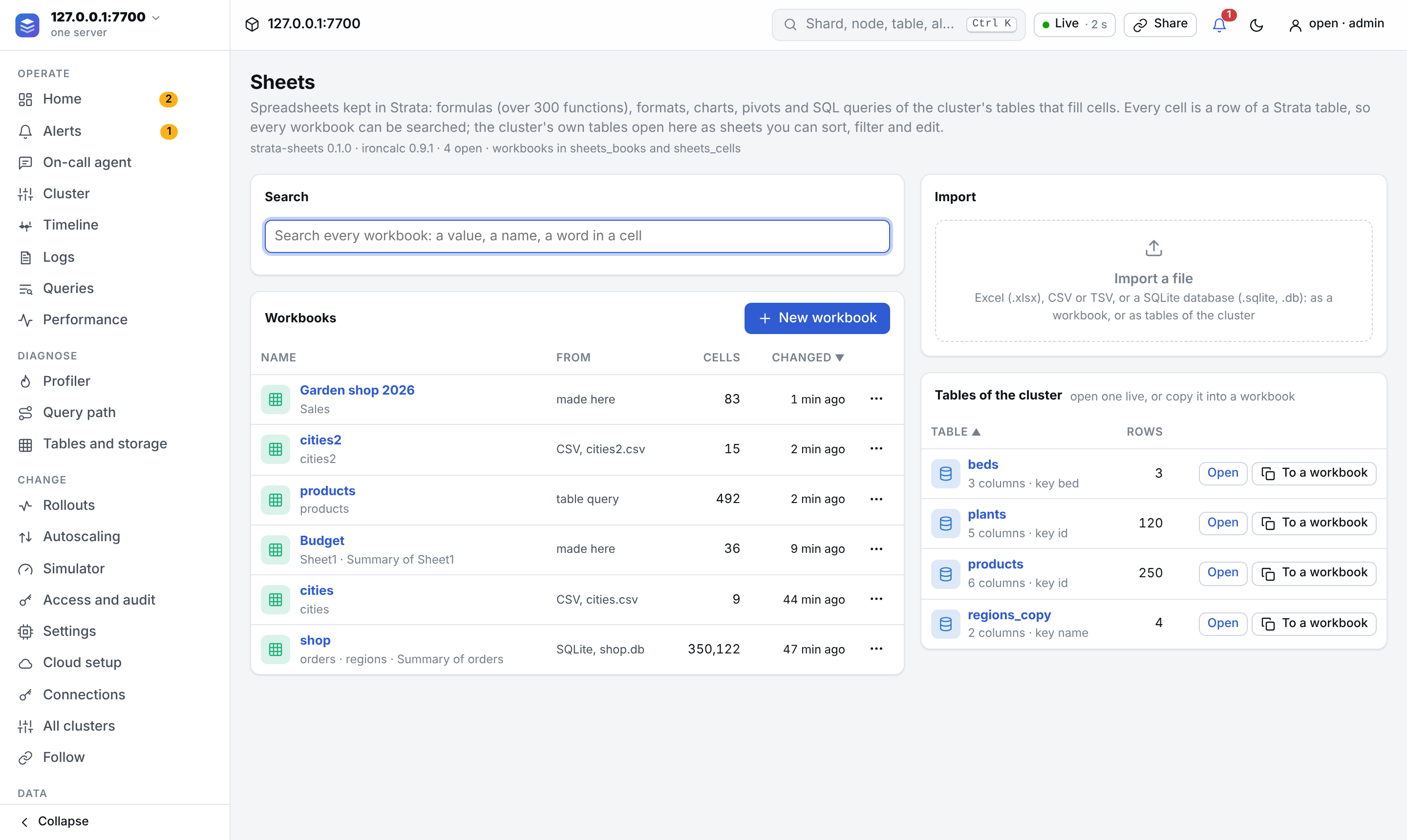
--local DIR starts a chloedb-server on 127.0.0.1:7700 (--local-listen) with its database in DIR, lists chloedb-sheets on it as the app sheets, and stops it when chloedb-sheets stops; the same DIR again serves the same workbooks.
Against a cluster that runs elsewhere, give chloedb-sheets the server (a coordinator or one server) and a key, and give the server the app. Its first start creates the two tables it keeps workbooks in, which takes an admin key; after that a key that can write is enough:
chloedb-sheets serve --server http://coordinator:7700 --key "$CHLOEDB_KEY" --token "$SHEETS_TOKEN" --listen 0.0.0.0:7820
chloedb-server ... --app sheets=http://sheets-host:7820   # with CHLOEDB_APP_TOKEN=$SHEETS_TOKEN
--server was --strata before 0.3.2; the old name still works.
--token (or CHLOEDB_SHEETS_TOKEN) is the bearer token its API requires; the server sends its CHLOEDB_APP_TOKEN (apps). Requests that carry an Origin header are refused, so a page on another site cannot reach the app even from inside the network. It checks its callers itself ("checks_callers": true in its manifest), so chloedb-server sends it keys limited to tables, and keys that may only write, with who they are (x-chloedb-principal, x-chloedb-scope, x-chloedb-tables). A key that may write makes workbooks, which are its own: it changes them, shares them (Share, POST /v1/books/:id/share {shared}) and deletes them, and another key opens one only once it is shared, or when it is an admin of every table. A workbook made before owners existed is everyone's. What a workbook reads from the cluster (its query blocks, the tables opened as sheets, a sheet copied to a table) runs as the caller's key: chloedb-sheets sends its own token narrowed to the caller's grants (x-chloedb-as-tables, server), so a query reads only the tables the signed-in key may read, and a refusal is the server's 403. The analyst preset's keys make their own workbooks this way. Called directly with its token (not through chloedb-server), it answers as before, as the token's.
On Kubernetes#
A cluster the operator runs gets spreadsheets of its own from its StrataCluster, with nothing to start by hand:
kubectl -n strata patch strata demo --type merge -p '{"spec": {"sheets": {}}}'
The operator runs chloedb-sheets serve from the cluster's own image (it carries it, as it carries the crawler) as a Deployment of one pod, <cluster>-sheets, behind a Service of that name, and restarts the coordinators so that they list it: Apps → Sheets appears in the command center. It reads and writes with the cluster's admin token (tokenSecret), which its API requires too, so the coordinators send it that token and nothing else reaches it. Its workbooks are rows of the cluster's tables, so a pod started again (a new image, a node replaced) has them all; the upgrader moves it with the servers, since it runs their image.
spec.sheets |
default | |
|---|---|---|
paused |
false |
no pod for now (the coordinators still list it, as an app that does not answer; the workbooks stay) |
args, resources |
more arguments of chloedb-sheets serve, and its container's resources (50m CPU and 96 MiB asked, 1 GiB at most) |
Removing spec.sheets deletes its Deployment and Service and restarts the coordinators without it; the workbooks stay in sheets_books and sheets_cells.
From the command line#
import and export move files without the UI:
target/release/chloedb-sheets import budget.xlsx --server http://127.0.0.1:7700
target/release/chloedb-sheets import shop.sqlite --tables orders,customers --name Shop --server http://127.0.0.1:7700
target/release/chloedb-sheets export <workbook id> -o budget.xlsx --server http://127.0.0.1:7700
The app#
Sheets lists the workbooks, newest first (Mine, Shared or All, with each one's owner), the cluster's tables, a search over every workbook, and an import area that takes a file dropped on it. A SQLite file asks which of its tables to bring and where: as sheets of a new workbook, or as tables of the cluster (through chloedb-server's own SQLite import, with the signed-in key, keeping the columns' types, keys and indexes). A file is not trusted: a SQLite file's views come in only when named (a view runs its query as it is read, and that query may not end), and reading one stops after 60 s for the list of tables and 180 s for the import; an xlsx file may expand to at most 512 MB and hold at most 2 million cells.
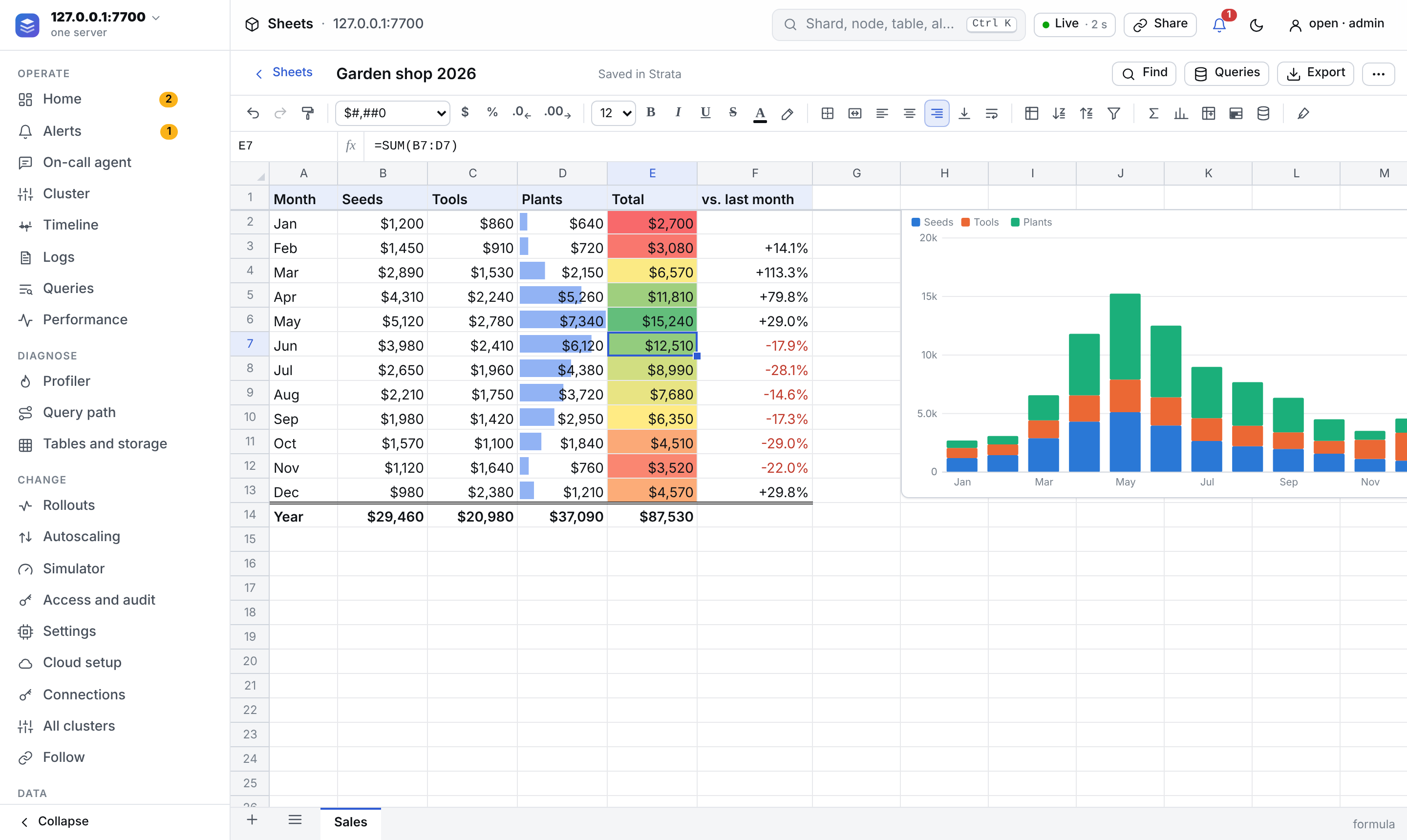
A workbook is a grid drawn on a canvas, so a sheet of a million rows scrolls as one of ten; its cells are read a tile at a time as they come into view. Above it:
- the toolbar: undo and redo, the format painter, number formats (and decimals, currency, percent), font size, bold, italic, underline and strikethrough, text and fill colors, borders, merging, alignment and wrapping, frozen rows and columns, sorting and filters, Σ (sum, average, count, max, min, median of the cells above or of each column), charts, pivot tables, conditional formats, named ranges, SQL queries, and clearing formats;
- the formula bar, with the name box (a cell, a range or a name to go to) and, as a formula is typed, the functions that match and the arguments of the one the caret is in; clicking or dragging over cells while typing a formula puts their reference in, and the ranges a formula refers to are outlined in color.
The grid does what a spreadsheet's does: arrows, Tab, Enter (back to the column a run of Tabs started from) and Ctrl+arrows to move, Shift to extend, typing to replace a cell and F2 or a double click to edit it, Ctrl+Enter into every selected cell, the fill handle (drag it, or double click it to fill down the data), column and row resizing (double click a column's edge to fit its contents), cut, copy and paste (within the app formulas move and formats come along; from other programs, tab-separated text), right-click menus to insert, delete, hide and show rows and columns, and the usual shortcuts (More → Keyboard shortcuts lists them). The sheet tabs below rename, recolor, duplicate, hide, move (drag them) and delete sheets, and the status bar shows the sum, average, count, minimum and maximum of the selection.
A filter puts buttons on the header row of a range: each lists the column's values with their counts, to choose the ones shown, and sorts. It is kept with the workbook. A chart (column, bar, line, area, pie or scatter, stacked or not) is drawn over the sheet from a range whose first row names the series and first column holds the categories; drag it by its title, resize it from its corner, double click it to edit it. Summarize makes a pivot table of a range on a new sheet: its rows grouped by the values of the columns chosen, with sums, counts, averages, minimums, maximums or distinct counts of others, and a total row. Conditional formatting colors cells by their value (greater than, between, text that contains, duplicates, the top 10, above average, a formula), and draws color scales, data bars and icons. Queries lists the workbook's SQL blocks, to go to, edit, run again or drop.
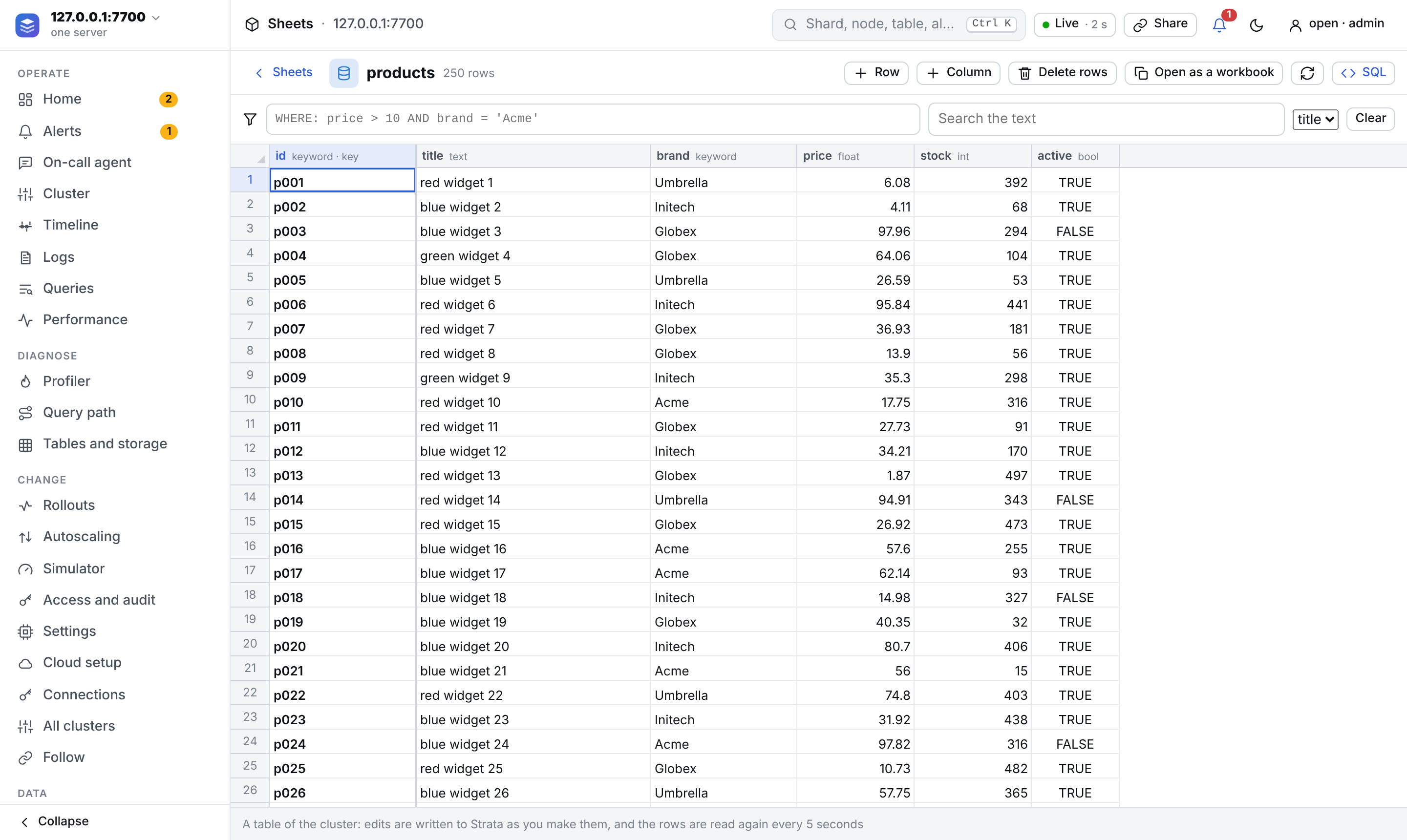
A table of the cluster opens at #/app/sheets/t/<table> as a sheet whose columns are the table's, named and typed in the header. Rows are read a page of 100 at a time as they come into view, ordered by the key (or by the column whose header you click, then by the key), and read again every five seconds. Typing into a cell sets that field of that row ({"op": "set"} by key); pasting sets many; Delete clears them. Row adds one, Column runs ALTER TABLE ... ADD COLUMN, Delete rows deletes the rows selected (after asking), and Open as a workbook copies the rows shown (the filter and order included) into a new workbook, for formulas, charts and pivots over them. A row's key does not change in place.
Numbers are shown as Excel's General format shows them, to 15 significant digits and no more (226159459.83, 4.1271186440678, 1.5E+20), in the grid, a CSV and an xlsx file alike; a number format of the cell's own still applies. Charts do not go into an .xlsx file: the file keeps the cells, formulas and formats, and the download says how many charts it left out (the x-app-left-out header of GET /v1/books/:id/xlsx).
How workbooks are kept#
Two tables hold every workbook. chloedb-sheets creates them at its first start:
| table | one row | what it holds |
|---|---|---|
sheets_books |
a workbook | its name, where it came from, its sheets' names, its counts, and its frame: the workbook without its cells (styles, column widths, row heights, merges, names, conditional formats, frozen panes), IronCalc's model encoded with bitcode, as base64; and its charts, queries and filters as JSON |
sheets_cells |
a cell | book:sheet:row:col as its key, the sheet's name, its reference (B7), what it shows (text, searched with BM25), its number, its input (a formula, or what was typed), its style's index and kind |
sheets_cells is sharded by the workbook (shard_by), so a workbook's cells sit on one shard and are read in one pass, and clustered by it, so they are read in order. After each change chloedb-sheets compares every cell it touched with what it wrote last, and writes only the cells that changed, in one transaction with the workbook's row; the 350,000 cells of a 50,000-row SQLite import took 8.7 s to write, a change to one cell of it 0.1 to 0.15 s, on the container this was built in. A workbook is held in memory while it is used and let go after 30 minutes unused, or sooner, the least recently used first, when the open workbooks hold more than 1.5 million cells together (CHLOEDB_SHEETS_OPEN_CELLS); a write ChloeDB refuses is retried every 30 seconds, and the workbook says it is not saved yet until one succeeds.
Changing an open workbook from two places is safe: chloedb-sheets applies changes to a workbook one at a time, and each viewer reads what changed since the version it holds (GET /v1/books/<id>/changes?since=) every three seconds, or redraws the sheet when rows or columns moved.
Its API#
Each route is under the app's address (through chloedb-server: /v1/apps/sheets/...), and takes the token.
| route | what |
|---|---|
GET /v1/books?whose=mine\|shared\|all, POST /v1/books {name} |
the workbooks the caller may open (with owner and shared, and the caller as me); a new one, the caller's |
POST /v1/import?name=&format=&tables=&header= |
a file (the body) as a new workbook: xlsx, csv, tsv or sqlite (by default what the bytes are); a SQLite file's tables, a CSV file's header |
POST /v1/sqlite/tables |
a SQLite file's tables, their columns and row counts, and its views ("kind": "view", not counted) |
POST /v1/from-table {table \| sql, name, limit} |
a table of the cluster, or a SELECT's answer, as a new workbook |
GET /v1/search?q=&limit= |
the cells and workbooks that hold the words |
GET, DELETE /v1/books/<id> |
a workbook's summary (sheets, names, charts, queries, filters, whether it can undo); deleting it |
POST /v1/books/<id>/ops {ops} |
changes, in order, each one step to undo: set, set_many, array_formula, clear, style, border, insert_rows, delete_rows, insert_cols, delete_cols, move_rows, move_cols, col_width, row_height, hide_rows, hide_cols, freeze, grid_lines, merge, unmerge, add_sheet, delete_sheet, rename_sheet, move_sheet, duplicate_sheet, sheet_color, hide_sheet, autofill, paste, paste_text, sort, filter, replace, define_name, update_name, delete_name, add_format, delete_format, undo, redo, rename_book, chart, delete_chart, summarize; the answer has the cells that changed |
GET /v1/books/<id>/cells?sheet=&r0=&r1=&c0=&c1=, /layout?sheet=, /values?sheet=&range= |
an area's cells (what each shows, its type, style and input); a sheet's layout; a range's values as numbers |
GET /v1/books/<id>/changes?since= |
what changed since a version |
POST /v1/books/<id>/copy {sheet, area} |
an area as a clipboard for paste, and as tab-separated text |
GET /v1/books/<id>/find?q=&sheet=&case=&whole=&formulas= |
the cells that hold a text |
GET /v1/books/<id>/export?format=xlsx\|csv&sheet= |
the workbook as a file |
POST /v1/books/<id>/query {sheet, row, col, sql, limit, id}, POST /v1/books/<id>/refresh, DELETE /v1/books/<id>/queries/<qid> |
a SQL block (new, or id's again); every block again; one dropped (its cells stay) |
POST /v1/books/<id>/to-table {sheet, table, key} |
a sheet as a table of the cluster |
An import holds at most 2,000,000 cells, and a query block or a table copied into a workbook at most 100,000 rows.