
 Chloe
Install ChloeCtx on your machine
Reference, rendered from docs/chloectx/setup.md.
These docs describe release 0.3.11. The docs of main describe the code as it is now.
On this page
- What you need
- As a Claude Code plugin
- Prebuilt
- Install in one command, from source
- Or let your agent do it
- Or step by step
- Check it
- Try it for real
- Explore your stores: chloectx ui
- Where everything lives
- Other environments
- For a team
- Upgrade and remove
- Keep the stores tidy: chloectx stores and chloectx prune
- ChloeCtx was called Engram
- Troubleshooting
ChloeCtx runs next to your own Claude Code: hooks record each session into a local ChloeDB file per project, and a small MCP server lets the model search that history. This page takes a fresh macOS or Linux machine to a working install in a few minutes, shows how to check it, and covers remote boxes, dev containers and upgrades.
What you need#
| why | check | |
|---|---|---|
| macOS or Linux (Windows through WSL 2) | the daemon talks to the hooks over a Unix socket | uname -s |
| Rust, stable | to build ChloeCtx from source (not for the prebuilt binary) | cargo --version (install from rustup.rs) |
| a C compiler | to build from source: the tokenizer's regex library is C | cc --version (xcode-select --install on macOS, build-essential on Debian/Ubuntu) |
curl |
downloads the 129 MB embedding model once | curl --version |
| Claude Code CLI, logged in | the hooks and the MCP server plug into it, and the distiller calls claude -p after each turn |
claude auth status shows "loggedIn": true |
Python 3 is only needed for the scripted demo and the evaluation harnesses, not for ChloeCtx itself.
The CLI login matters more than it looks. The distiller runs claude -p in the background, so an expired CLI login breaks it even while interactive sessions (or the desktop app) keep working. Recording and recall still work in that state, but nothing new is written down. chloectx doctor checks for it.
ChloeCtx makes model calls of its own, through claude -p with a small model (haiku by default), billed to the CLI's login: one after each turn to write down decisions and rules (about $0.001 to $0.002); after each of your own turns that is like something you said before, one more to see whether you had to say it again, which makes it a rule (about $0.0005); and, once a project's store holds 20 records, two more after each prompt of four words or more, in the background, to search memory for it (query understanding, about $0.001 to $0.002 a prompt). chloectx doctor shows what these calls cost in your own store over the last 30 days. None of them holds up a turn: what the search finds comes with the turn's next tool result, or at the next prompt; a find that holds a rule or decision of yours the session was not shown, ready when the turn ends, is given then, and Claude checks its answer against it. CHLOECTX_DISTILL=0 turns the first two off, CHLOECTX_DEEP=off (or tool, only when the model asks) the last.
The session's own model reads ChloeCtx's context too: the briefing, up to 6,000 characters (about 1,500 tokens), at the start of each session and again on each claude --continue or --resume, and the notes that come with a prompt.
The daemon that makes these calls finds the claude CLI where Claude Code's hooks found it, on its own PATH, or in the usual install places (~/.local/bin, ~/.claude/local, /opt/homebrew/bin, /usr/local/bin); CHLOECTX_CLAUDE names it outright. chloectx doctor shows which one the running daemon uses.
As a Claude Code plugin#
The repository is a Claude Code plugin marketplace, named chloedb, with ChloeCtx as its plugin chloectx. In Claude Code:
/plugin marketplace add chloetech-ai/chloedb
/plugin install chloectx@chloedb
On Claude Code 2.1.275 or later, /plugin install chloectx --marketplace chloetech-ai/chloedb does both. From a shell, claude plugin marketplace add chloetech-ai/chloedb && claude plugin install chloectx@chloedb installs it for every session, and --scope local (in the project's folder) for one project only. The plugin's name comes from the repository's .claude-plugin/marketplace.json, not from the address it is added by: chloetech-ai/strata, the repository's old address, still redirects and gives the same chloectx@chloedb.
It needs no Rust and no clone of your own. Then start a new session. Its hooks and its MCP server run a small launcher in the plugin (scripts/chloectx-launch), which runs the first chloectx it finds: $CHLOECTX_BIN, chloectx on your PATH, or ~/.local/bin/chloectx. When there is none, it sets ChloeCtx up once, in the background:
- it downloads the prebuilt
chloectxof the release that matches the plugin's version (the archivechloectx-<platform>.tar.gzof the releasechloedb-server-v<version>, from the releases; the newest release when that one has none), checks its SHA-256 against the release's.sha256and refuses one that differs, checks its build provenance where GitHub's CLI (gh) is installed (releases from 0.3.8; one that does not verify is refused;CHLOECTX_VERIFY=requirerefuses to install withoutgh,=offskips the check: checking what you download), and installs it as~/.local/bin/chloectx, sochloectx doctor,chloectx uiand the other commands work from a shell too; - where there is no prebuilt one (Windows outside WSL 2, Alpine and other musl systems, glibc older than 2.35), or the download failed, it builds it from a checkout with
cargo(Rust and a C compiler;install.sh --no-wirein$CHLOECTX_SOURCE, or in the clone of the marketplace), which takes several minutes; - it fetches the embedding model (
chloectx fetch-model, 129 MB, SHA-256 checked).
Until that is done, which is usually well under a minute, the hooks record nothing, and the first session's start says so; the memory tools come with the next session if they were not ready within 25 seconds. The launcher writes what it did to ~/.claude/plugins/data/chloectx-chloedb/setup.log, and when it cannot set up, the next session's start says why. To watch it, or to try again by hand: ~/.claude/plugins/cache/chloedb/chloectx/<version>/scripts/chloectx-launch setup. When the plugin is updated (/plugin update, or Claude Code's auto-update) to a new version, the launcher replaces a chloectx it downloaded with the new version's; one you installed yourself is yours to upgrade.
Claude Code clones the whole repository for the marketplace, into ~/.claude/plugins/marketplaces/chloedb: 665 MB on 17 November 2026 (Claude Code 2.1.326), of which 213 MB is .git and most of the rest benchmark results the plugin does not use. claude plugin marketplace add chloetech-ai/chloedb --sparse .claude-plugin chloectx/plugin checks out only the plugin, about 2 MB, which leaves no checkout to build from on a machine without a prebuilt chloectx. Either way, the prebuilt chloectx takes another 137 MB in ~/.local/bin and the embedding model 129 MB.
How it differs from chloectx install --user:
| the plugin | chloectx install --user (./install.sh) |
|
|---|---|---|
| hooks | the same eleven events, from the plugin, through its launcher | in ~/.claude/settings.json |
| MCP server | plugin:chloectx:chloectx, tools mcp__plugin_chloectx_chloectx__* |
chloectx at user scope, tools mcp__chloectx__* |
| the memory tools' permission | asked the first time each is used (add mcp__plugin_chloectx_chloectx to permissions.allow to stop asking) |
allowed by the install (mcp__chloectx) |
| distillation model | haiku, unless CHLOECTX_DISTILL_MODEL is set (in the settings' env, say) |
--distill-model, written into the settings' env |
| upgrade | /plugin update chloectx@chloedb |
chloectx upgrade |
| remove | /plugin uninstall chloectx@chloedb (keeps ~/.local/bin/chloectx, the model and the stores) |
chloectx uninstall --user (keeps the binary and the stores) |
Both use the same stores, one per project. A project with its own chloectx install keeps using that one, and the plugin's hooks step aside there, as the user-level ones do. With both the plugin and chloectx install --user, the hooks of the user settings record and the plugin's step aside, but a session has the memory tools twice; chloectx doctor warns, and chloectx uninstall --user leaves only the plugin. Doctor shows the plugin:
  ok    plugin: chloectx@chloedb 0.3.11, enabled in /home/you/.claude/settings.json (11 hook events, through /home/you/.claude/plugins/cache/chloedb/chloectx/0.3.11/scripts/chloectx-launch)
  ok    MCP server: the plugin's, plugin:chloectx:chloectx (its tools are mcp__plugin_chloectx_chloectx__*)
| launcher variable | effect |
|---|---|
CHLOECTX_BIN |
the chloectx to run, wherever it is |
CHLOECTX_PREFIX |
where a downloaded or built chloectx goes: DIR/bin (default ~/.local) |
CHLOECTX_VERSION |
the release to download, instead of the plugin's version |
CHLOECTX_RELEASES_URL |
where the releases are (default https://github.com/chloetech-ai/chloedb/releases/download) |
CHLOECTX_SOURCE |
a checkout to build from when there is no prebuilt chloectx |
CHLOECTX_BUILD=0 |
never build from source |
CHLOECTX_PLUGIN_WAIT |
how long the MCP server waits for the setup, in seconds (default 25) |
Prebuilt#
since 0.3.2 From release 0.3.2, the ChloeDB installer fetches chloectx prebuilt (macOS 11 or later, Linux with glibc 2.35 or later), with no Rust and no clone; then fetch the model, wire it into Claude Code and check:
curl -fsSL https://chloetech-ai.github.io/chloedb/install.sh | sh -s -- --with ctx    # ~/.local/bin/chloectx
~/.local/bin/chloectx fetch-model                    # potion-retrieval-32M, 129 MB, SHA-256 checked
~/.local/bin/chloectx install --project /absolute/path/to/project --distill-model haiku    # or: install --user --distill-model haiku, every session
~/.local/bin/chloectx doctor
Without --distill-model, the distiller runs the Claude Code CLI's default model, and chloectx doctor warns that a small one is enough; install again with --distill-model haiku to change it. Release 0.3.1 and earlier have no prebuilt chloectx: build it from source, below. This installer (the website's install.sh) is not the repository's ./install.sh, which installs ChloeCtx from a checkout and wires it in one step (next section), and takes the same prebuilt binary when it can.
Install in one command, from source#
git clone https://github.com/chloetech-ai/chloedb && cd chloedb && ./install.sh
install.sh does five things and can be run again at any time:
- builds
chloectxin release mode (a few minutes the first time), or takes the release's prebuilt one (below); - copies it to
~/.local/bin/chloectx, the path the hooks call; - stops any running ChloeCtx daemons, so they restart on the new binary;
- downloads the embedding model (potion-retrieval-32M) unless it is already there;
- runs
chloectx install --user --distill-model haikuand thenchloectx doctor.
| option | effect |
|---|---|
--project DIR |
install into one project's .claude/settings.local.json and .mcp.json instead of every session |
--distill-model NAME |
the model that writes down decisions and rules after each turn (default haiku; --distill-model "" uses the CLI's default model) |
--prefix DIR |
install the binary to DIR/bin (default ~/.local) |
--no-wire |
install the binary only, and leave Claude Code's settings alone |
--no-model |
do not download the embedding model (run chloectx fetch-model later) |
--prebuilt |
take the release's prebuilt chloectx, never build |
--source |
build from the checkout, never download the binary |
From the release after 0.3.2, install.sh can take the binary that release carries instead of building it. Without --prebuilt or --source, it takes the prebuilt binary of release chloedb-server-v<version> (the version in chloectx/Cargo.toml), checked against the release's SHA-256 and, where gh is installed, its build provenance (from 0.3.8; CHLOEDB_VERIFY=require or =off as for the plugin), in two cases: when the checkout is that release's (the tag, with chloectx/ and chloedb/ unchanged since), and when there is no Rust on the machine (then it says the checkout may be newer than the release). Otherwise it builds, so a checkout of main, or one you changed, runs what is in it. To install such a release with nothing to compile, clone its tag: git clone --branch chloedb-server-v<version> https://github.com/chloetech-ai/chloedb, then ./install.sh in it. (A checkout of 0.3.2 or earlier has the install.sh that always builds.)
A prebuilt binary does not know the checkout it came with, so chloectx upgrade and chloectx doctor cannot compare it with one or rebuild it, even when ./install.sh took it in a checkout of yours. To upgrade a checkout of a release tag, move it to the new release's tag and run the installer again, which takes that release's prebuilt binary: git fetch --tags && git checkout chloedb-server-v<version> && ./install.sh. CHLOECTX_SOURCE=/path/to/chloedb chloectx upgrade is for a checkout on a branch, such as main, which it pulls and builds; on a tag (a detached HEAD) it stops and says so.
Sessions that were already open pick ChloeCtx up when they restart.
Or let your agent do it#
Tell Claude Code (or another coding agent) in any session:
Clone https://github.com/chloetech-ai/chloedb and set ChloeCtx up for my Claude Code by following its AGENTS.md.
AGENTS.md tells the agent to check the prerequisites without installing anything unasked, to ask you whether to install for every session or one project, to run install.sh and chloectx doctor, and to report what failed. Two things stay with you: claude auth login if the CLI is logged out (it is interactive), and starting a new session afterwards, because the session that ran the install started before the hooks existed.
Or step by step#
git clone https://github.com/chloetech-ai/chloedb && cd chloedb/chloectx
cargo build --release --bin chloectx
cargo install --path . --bin chloectx --root ~/.local       # a stable path for the hooks: ~/.local/bin/chloectx
chloectx fetch-model                                        # potion-retrieval-32M, 129 MB, at a pinned revision, SHA-256 checked
chloectx install --user --distill-model haiku               # or: chloectx install --project /path/to/project --distill-model haiku
chloectx doctor
chloectx install --user merges eleven hooks and a permission for the memory tools into ~/.claude/settings.json and registers the MCP server at user scope with claude mcp add-json. Each run saves the previous settings.json next to it as settings.json.chloectx-<time>.bak, and so does chloectx uninstall --user; nothing deletes these backups, so remove the old ones once you are happy. A project install backs up the project's .claude/settings.local.json and .mcp.json the same way, when it changes them. It adds those two files to the repository's .git/info/exclude, since they hold this machine's paths, but not the .bak files next to them: git status shows them (as ?? .claude/). Delete them, and do not commit them. Every settings file is written to a file beside it and renamed into place, so an interrupted install leaves the old file whole, and its keys stay in the order they were. A project with its own chloectx install keeps using that one; the user-level hooks step aside there, so nothing is recorded twice.
Check it#
$ chloectx doctor
ChloeCtx 0.3.11 for /home/you/code/app
  ok    binary: /home/you/.local/bin/chloectx
  ok    version: built from 1847ac7072, up to date with origin/main
  ok    Claude Code CLI: 2.1.326 (Claude Code) (/home/you/.local/bin/claude)
  ok    user hooks: /home/you/.claude/settings.json (11 events, /home/you/.local/bin/chloectx)
  ok    MCP server: user scope in /home/you/.claude.json (/home/you/.local/bin/chloectx mcp)
  ok    embedding model: /home/you/.local/share/chloectx/models/potion-retrieval-32M
  ok    distillation: model haiku (from the user settings), after each turn
  ok    Claude Code login: logged in, so the distiller and query understanding can run
  ok    query understanding: after the prompt, in the background (the default): after each prompt of 4 words or more, once the store holds 20 records, 2 model calls (haiku: one plans the searches, one picks the records); nothing waits for it: what it finds comes with the turn's next tool result or the next prompt, and the end of a turn does not wait (stop_recheck off)
  ok    query understanding cost: nothing measured in this store's last 30 days yet (about $0.001 a search with haiku)
  ok    distillation cost: nothing measured in this store's last 30 days yet (about $0.001 a turn with haiku)
  ok    daemon: a scratch store opened and answered in 1016 ms; this project's store will be /home/you/.local/share/chloectx/projects/app-e10db370 once a session runs here
ChloeCtx is ready. Start `claude` in a project; `chloectx ui` shows what it stores.
doctor checks the current directory's project. The version line compares the binary with the checkout it was built from; a prebuilt binary has none, and the line says how to upgrade it instead (below). Once a session has run there, the last line becomes the store itself (records, sessions, daemon round trip), lines for the store's size on disk and the daemon's own claude CLI follow, and a last distillation line reports whether the most recent distillation worked. Every failed line says how to fix it, and the command exits non-zero when anything failed.
It also says what ChloeCtx's own model calls do and cost, with the settings the hooks see (the environment, then the env of the project's local settings, the project's settings and the user settings, then the store's config.json):
query understandingsays when it runs: after the prompt, in the background (async, the default), at prompt time with the prompt waiting for it (sync, a warning), only when the model asks (tool), or never (off). It names the setting it came from, the model calls each prompt makes, and whether the end of a turn waits for it, which it does only withstop_recheckon (a warning: Claude may then run again).query understanding costanddistillation costare measured from the store'sevents.logover the last 30 days: how many calls, the median time, the dollars in all and per call, and how many failed.Claude Code loginsays whether the distiller and query understanding can run: both callclaude -p, which needs the CLI to be found and logged in.
Try it for real#
A two-minute check that memory carries across sessions. In any project:
- Start
claudeand state something only a conversation would know, for example: "Rule from the client: all amounts are integer cents, never floats, because their ledger rejects fractional cents. The server runs Python 3.8, so no match statements." Let it answer, then exit. - Start a new session in the same directory and ask: "Write billing.py with total(items), following every rule the client gave us."
The new session starts with ChloeCtx's briefing, which lists the rules the distiller wrote down after the first session, and the code should use integer cents and avoid match. Then look at what happened:
chloectx ui                                         # the inspector over every store on this machine
chloectx search "integer cents"                     # hybrid search from the shell
chloectx sql "SELECT kind, tag, text FROM memory WHERE kind IN ('decision', 'preference') ORDER BY seq DESC LIMIT 10"
Explore your stores: chloectx ui#
chloectx ui                      # opens the inspector at http://127.0.0.1:8765/?token=...
chloectx ui --no-open --port 9000
chloectx ui --home ~/chloectx-demo/chloectx  # stores kept elsewhere (here: the scripted demo's)
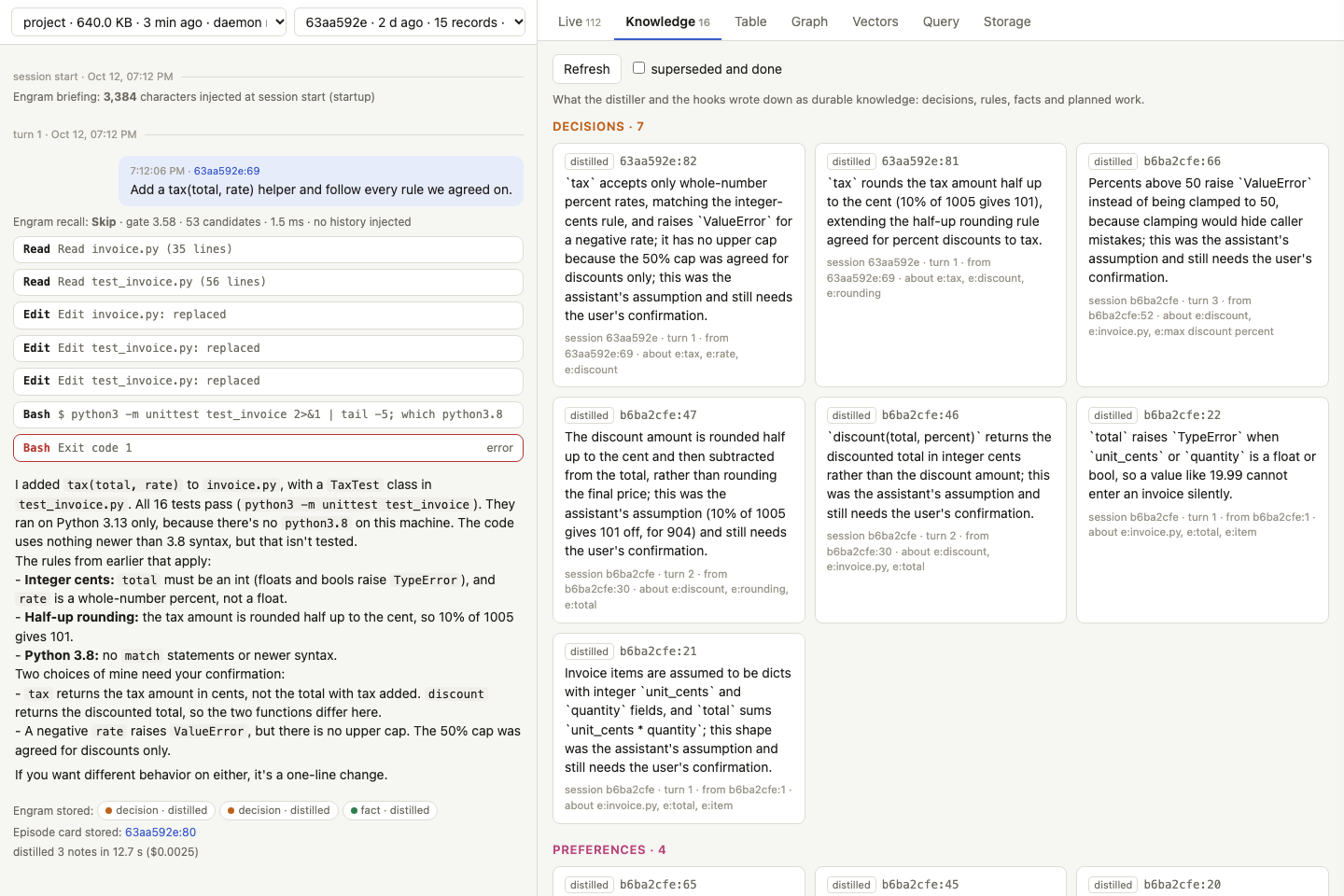
chloectx ui is the live inspector pointed at your own data. The left column picks a store (one per project directory, newest first) and a session, and replays that session from its records: prompts, answers, tool calls (open one to see its stored result), the briefing at session start, every recall decision with its gate score and the records it injected, and the notes the distiller kept, superseded or closed. A session that is still running grows as it goes. The right side has every panel of the inspector, scoped to the chosen store: the live feed of records and daemon events, knowledge, the table, the graph, the vectors, an SQL console and the storage layout.
It is built into the binary (no Python, no checkout needed). It reads each store through its project's daemon, as the hooks do, so it is safe to keep open while sessions write; the one thing it changes is what you tell it to forget, from the Forget… button on a knowledge card or record, which lists what would go before it deletes anything (forget something). It listens on 127.0.0.1, and every request must carry the random token in the URL it prints, because stores hold transcripts. Links keep the store, session and tab in the address (?store=…&session=…&tab=knowledge), so a view can be reopened later.
It is also the quickest way to debug an install. A DISTILL event with an error in the live feed means the distiller cannot run claude -p; a RECALL · SKIP on every prompt with few candidates means the store is still small; no records at all for a session means its hooks did not run.
Where everything lives#
| what | where |
|---|---|
| binary | ~/.local/bin/chloectx (from install.sh or cargo install --root ~/.local) |
| hooks | ~/.claude/settings.json (user install), the project's .claude/settings.local.json, or the plugin's hooks/hooks.json under ~/.claude/plugins/cache/chloedb/chloectx/<version>/ |
| MCP server | ~/.claude.json at user scope, the project's .mcp.json, or the plugin's .mcp.json |
| the plugin's launcher state | ~/.claude/plugins/data/chloectx-chloedb/: setup.log, and ready once it has set up |
| stores | ~/.local/share/chloectx/projects/<folder>-<hash>/, one per project directory (a repository's worktrees share its main checkout's): memory.strata and its WAL, state.json, events.log (recall and distill decisions), daemon.log, project.txt. A machine that has ~/.local/share/engram from before the rename, and no ~/.local/share/chloectx, keeps using the old folder |
| embedding model | ~/.local/share/chloectx/models/potion-retrieval-32M/ (or in the old folder, as the stores) |
| daemon socket | engram.sock in the store, or, when that path is too long, $XDG_RUNTIME_DIR, /tmp/engram-<uid>/ or ~/.cache/chloectx/: the first that is a directory of yours alone (a /tmp/engram-<uid> another user made, or a link, is skipped) |
| model calls' working directory | distill/ in the stores' folder, private to you (the distiller's claude -p reads project settings from where it runs) |
Store directories are created readable by their owner only. ChloeCtx redacts secrets before it stores anything (below), but a store is still a transcript of your sessions: treat it like your shell history.
Secrets and chloectx redact#
Every record is redacted as it is stored, whatever wrote it (the hooks, ingest-transcript, remember, the distiller, compaction summaries), and again as chloectx sync sends or pulls it. So are the prompts kept in state.json and the lines of events.log. A secret is replaced by a marker that names its kind, and the text around it stays, so DB_PASSWORD=hunter2 is stored as DB_PASSWORD=[REDACTED:password]. What is caught:
- keys and tokens by their shape: Anthropic (
sk-ant-), OpenAI (sk-,sk-proj-), GitHub (ghp_,gho_,ghu_,ghs_,ghr_,github_pat_), GitLab (glpat-), npm (npm_), PyPI (pypi-AgE…), AWS access key ids (AKIA,ASIA), Google API keys (AIza) and OAuth tokens (ya29.), Slack tokens (xoxb-and the like) and webhooks, Discord webhooks, Stripe (sk_live_,rk_live_,whsec_), DigitalOcean (dop_v1_), Hugging Face (hf_), SendGrid, HashiCorp Vault (hvs.,hvb.,hvr.), age secret keys (AGE-SECRET-KEY-1), Shopify (shpat_and its kin), Square (sq0atp-,sq0csp-), Linear (lin_api_), Postman (PMAK-), New Relic (NRAK-and its kin), Grafana (glsa_,glc_), Sentry (sntrys_,sntryu_), Mailgun (key-and 32 hex digits), Doppler (dp.st.and its kin), Databricks (dapi), Supabase (sbp_), Tailscale (tskey-), Atlassian (ATATT3), Pulumi (pul-), Terraform Cloud (….atlasv1.…), Twilio API keys (SKand 32 hex digits), Notion (ntn_), Docker Hub (dckr_pat_), Telegram bots' tokens, Sentry DSNs, ChloeDB API keys (sk_<id>_<secret>) and JWTs; - PEM private key blocks, also one cut off before its
ENDline; Authorization:headers (Bearer,Basicand others),Bearertokens,curl -u user:password, and the password in a URL (postgres://app:…@db);- a command line's password and key flags (
--password=…,--token …,--api-key …, not--password-fileor--token-stdin),mysql -p…,sshpass -p …anddocker login -p …; - the credentials of a Docker
config.json("auth") and an.npmrc(_auth); - values assigned to a name that ends in a word for a secret (token, secret, password, passwd, passphrase, credential, or a key such as
api_key,AWS_SECRET_ACCESS_KEY,apiKey,SECRET_KEY_BASE; or signing or hmac after another word, as inSESSION_SIGNING):NAME=valuein an environment dump or a.envfile,name: valuein YAML,"name": "value"in JSON,name = "value"in code, also after a label (here is my config: DB_PASSWORD=…, a CI file'srun: PGPASSWORD=… psql), andNAME valuewith a long value of letters and digits (a Dockerfile'sENV); - a secret named just before its value in a sentence: "the staging password is …", "password: …", "the token is …", "api key …", when the value has a letter and a digit and is no path, date or URL ("the password reset page" and "the token is invalid" keep their words). A session whose prompt held a secret is told that the prompt is recorded with the secret replaced.
It is pattern-based, so it is best effort: a password written in prose in any other way (one of letters only, or one the sentence calls "it"), or a random string under an unremarkable name, is stored as it is. It leaves alone what only looks random (git hashes, digests, UUIDs) and code that names a secret without holding one (token = get_token(), password: string, primary_key).
A store written before this redaction can hold secrets it would now catch (before 0.3.9, the shapes above from PyPI on, the flags, auth, and an assignment after a label were stored as typed; before 0.3.11, a secret named in a sentence). chloectx redact, in the project directory, rewrites them:
chloectx redact --dry-run   # count what would change; change nothing
chloectx redact             # this project's store
chloectx redact --all       # every store on this machine
The project's daemon rewrites each record whose text redaction changes, redacts state.json and events.log the same way, and, when a sync is set up, sends the rewritten records to the server again so they replace its copies. Then the daemon is stopped and the store's file replaced by a fresh copy of its live rows, because the pages the old versions were on would otherwise stay in the file until later writes reuse them; a hook that comes in those few seconds records nothing. It prints how many records, session states and log lines changed and which kinds of secret it found, never the secrets. What it cannot reach is up to you: backups made with chloectx backup, a memory.strata.before-field-ids copy left by a format upgrade (it names it), and the server's own backups.
Forget something: chloectx forget#
A fact usually lives in more than one record: the prompt that said it, the tool output that showed it, the answer and the notes written from it. So forget it by its words, in a project's folder:
chloectx forget --dry-run "staging codeword"   # list what goes and what stays, change nothing
chloectx forget "staging codeword"             # list it, ask, forget
chloectx forget a1b2c3d4:42                    # one record, by the id chloectx search shows
Given words that are not record ids (3 characters or more, whatever their case), it lists, before it asks:
- the records whose own text holds them, which are deleted, each with its kind and first line;
- the records that hold them only in their context, which stay. Every record of a turn carries that turn's request as its context, so a rule you gave in the same prompt as a private aside is one of these: the rule is kept, and the lines of its context that held the words are cut;
- how many session states, log lines and receipts hold them, which are scrubbed.
--yes skips the question; without a terminal and without --yes it only lists. Then the project's daemon deletes the records, cuts the words from the other records' context, and scrubs them from every file of the store: state.json (the session's last prompts), events.log and daemon.log, and every receipt that holds them (receipts.strata). The automatic snapshots are dropped, the segments of memory.strata and receipts.strata that held the old copies are rewritten, and the free pages of both files, where those copies were, are written with zeros. For five minutes after, nothing that holds the words is stored, so a note being distilled at that moment does not bring them back. Only the segments that held them are rewritten, not every segment with an older delete, so the cost is their size, not the store's.
By id, chloectx forget ID... deletes those records only, with the same scrubbing of receipts and snapshots; the other records of their turn stay.
memory_forget is the same for the model: asked to forget something, Claude passes its words as text (or one record's id). The turn that calls it stores no reply, card or narration and is not distilled, so no note says again what was forgotten, and nothing that holds the words is stored until the turn ends. It answers once the records are deleted and the files scrubbed, and the segments are rewritten after the answer (no snapshot is taken meanwhile), so a large store does not run past MCP's 20 s deadline; chloectx forget waits for all of it and says so.
With a sync set up, the deleted records' rows on the server are replaced by tombstones (rows of kind forgotten, with the record's id and no text), and the records whose context was cut are sent again to replace the server's copies. Every machine that pulled a record before forgets it on its next pull, receipts and segments too, and takes the cut contexts; a machine that pulls for the first time never stores it. The store keeps the deleted ids (in sync-forgotten.json) so that no pull stores them again, whichever machine pushes them back; a forget the server did not answer is sent again with each push. A machine running 0.3.8 or earlier keeps its copy, and may send it back, which replaces the tombstone: the machines of 0.3.9 that forgot it still never store it again, but a new machine would, so upgrade every machine of a team that forgets.
To find a fact in every project, --everywhere looks in every store chloectx stores lists, by text or by id, and lists what it finds by store:
chloectx forget --everywhere --dry-run "staging codeword"
chloectx forget --everywhere "staging codeword"
chloectx forget --everywhere --yes a1b2c3d4:42              # by id, in whichever store has it
A daemon started to look into a store is stopped afterwards. What forget cannot reach, and says when it can see it: named snapshots (chloectx snapshot drop NAME), a memory.strata.before-field-ids copy left by a format upgrade, backups made with chloectx backup, packs written with chloectx pack, Claude Code's own transcripts of your sessions (under ~/.claude/projects/), the copies machines running 0.3.8 or earlier pulled from a sync server before the forget, and the server's own backups.
To back a store up, run chloectx backup DEST in the project directory. It copies the store while sessions go on: a consistent checkpoint of memory.strata (copying the file itself while the daemon writes can catch it half way through a commit), state.json, the config and events.log, into a new directory DEST, making the folders above it if they are missing. To restore, run chloectx stop and copy those files back into the store's directory. A backup is as private as the store: only you can open its directory (0700) and files (0600).
| variable | effect |
|---|---|
CHLOECTX_DISABLE=1 |
the hooks do nothing in this session |
CHLOECTX_HOME |
where stores (and, by default, models) live; default $XDG_DATA_HOME/chloectx or ~/.local/share/chloectx (engram in place of chloectx when only that folder exists) |
CHLOECTX_MODELS |
where the embedding models live |
CHLOECTX_DISTILL_MODEL |
the distiller's model (install --distill-model sets it in the settings' env) |
CHLOECTX_DISTILL=0 |
no distillation (read from Claude Code's environment too, whichever process started the daemon) |
CHLOECTX_DEEP |
query understanding: async (default), sync, tool or off |
CHLOECTX_CLAUDE |
the claude CLI the model calls run, when it is in none of the places the daemon looks |
CHLOECTX_EMBEDDER |
static (default), bert, or hash:<dim> for a model-free hash embedder |
Each of them is still read under its name from before the rename, ENGRAM_* (ENGRAM_DISABLE=1), when the new one is not set.
Other environments#
A remote machine over SSH#
Install on the remote machine as above; the hooks run wherever claude runs. To browse its stores from your laptop, forward the port and open the URL chloectx ui prints:
ssh -L 8765:127.0.0.1:8765 you@devbox
chloectx ui --no-open        # on the devbox; open the printed URL in your laptop's browser
chloectx ui does not try to open a browser inside an SSH session.
Dev containers and Codespaces#
Run the installer when the container is created, for example in .devcontainer/devcontainer.json:
{
  "postCreateCommand": "git clone https://github.com/chloetech-ai/chloedb /tmp/chloedb && /tmp/chloedb/install.sh",
  "containerEnv": { "CHLOECTX_HOME": "/workspaces/.chloectx" },
  "forwardPorts": [8765]
}
The image needs Rust and a C compiler (the ghcr.io/devcontainers/features/rust feature provides both), and Claude Code must be logged in inside the container. A container's home directory is usually thrown away on rebuild, so point CHLOECTX_HOME at a mounted or persistent path (as above) if memory should survive rebuilds. Inside a container, start the inspector with chloectx ui --no-open and open the printed URL through the forwarded port.
Windows#
Use WSL 2 and run everything, including Claude Code, inside the Linux distribution. Native Windows is not supported: the daemon uses Unix sockets and flock.
Claude Code on the web#
Cloud sessions run in a fresh container each time, so a ChloeCtx store there starts empty and is lost when the container is reclaimed. To keep memory across them, sync it with a ChloeDB server (below): the environment's setup script installs ChloeCtx and names the server, the environment holds the server's key in a variable, and each session pulls the project's memory when its daemon starts.
Keep the memory on a ChloeDB server#
chloectx sync copies each project's memory to a table of its own, chloectx_mem_<project>, on a ChloeDB server or a cluster's coordinator, and back. The store stays a local file, so hooks and recall never wait on the network:
- the daemon pushes what it recorded every 30 seconds and as it exits, and when it starts it pulls the project's records the store lacks (written on another machine, or by a container that is gone), embeds them here, and applies what the server says of those it has (forgotten, deleted, retired: below);
- a project is its git repository (
owner/nameoforigin), so checkouts in different folders share one memory, and--rename owner/old=owner/newlets a checkout of a renamed repository join the new name's;chloectx sync statussays what the project syncs as (synced_as), andchloectx doctornames its table (chloectx_mem_, the name in lowercase letters, digits and_, then 8 hex digits of its hash:chloectx_mem_acme_web_1a2b3c4d), which the server can search too (SELECT content FROM chloectx_mem_acme_web_1a2b3c4d ORDER BY bm25(content, '...') DESC LIMIT 10); - a folder with no
originsyncs as its absolute path, and its table is named after that (/home/you/code/appsyncs intochloectx_mem_home_you_code_app_and its hash), so another machine shares it only from the same path.
# in the project's folder: the key from stdin, kept owner-only in ChloeCtx's home as this project's
printf %s "$KEY" | chloectx sync setup --url https://chloedb.example.com --token-stdin
# or: read it, whenever the daemon syncs, from a variable (a cloud environment's, say)
chloectx sync setup --url https://chloedb.example.com --token-env CHLOEDB_KEY
chloectx sync status        # what was sent and received, what the server holds
chloectx sync push          # now, rather than within 30 s; --again sends every record again
chloectx sync pull
chloectx sync accept        # what other machines sent that waits, by machine: ana-laptop (m-1a2b3c4d5e6f)
chloectx sync accept --origin ana-laptop    # its name or its id; or --all: the machines listed now
chloectx sync off           # this project stops syncing; --every-project: the machine's setting
chloectx sync retire a1b2c3d4:42    # a rule (or decision, fact, to-do, note) retired on every machine of the project
A project that is renamed starts its table again. The table is named by what the project syncs as: its repository (owner/name, from origin) or, with no remote, its folder. When that changes (an origin added, a repository renamed), setup says so and the next push sends every record to the new table. chloectx sync status warns when the server holds fewer of the project's records than the store sent or took from it, and chloectx sync push --again sends them all again. (0.3.7 and earlier keep the mark of what they sent, so the new table starts without the older records: run chloectx stop in the project's folder, delete the store's sync-state.json, and chloectx sync push.)
One key per project and machine. A table per project is the boundary between projects: a key limited to one project's table ("tables": {"chloectx_mem_acme_web_1a2b3c4d": "write"}) reads and writes that project and nothing else, so a laptop's key reads no other project's sessions, and a key that leaks writes only into its project. On a cluster's command center, "Make a sync key" on the ChloeCtx page (an admin's) asks for the project and the machine, makes the project's table and such a key, and shows the setup line with it (with --no-create, since that key cannot make tables). Without it: setup creates the project's table, which needs a key with the admin scope (--no-create skips it; the first push creates it when the key can), and an admin makes the key with POST /v1/admin/keys. A machine keeps a key for each project: setup --token-stdin, run in the project's folder, keeps the key as that project's (sync-keys/<table>.token in ChloeCtx's home). chloectx sync status says which key the project sends (key_from), and setup and chloectx doctor name the table a refused key needs. A setup the server refuses fails rather than saying it is set up: --token-stdin with nothing on stdin is an error (a script that failed to make the key), setup exits 1 when the server answers 401 or 403 (unless the key is to come from a --token-env variable this shell does not have), and doctor FAILs on a project the server refuses, asking it once when the project has not synced yet. A key for operations (role propose or ops, an on-call agent's) reads no synced memory and no local store through ChloeCtx's app, whatever else it reads.
Only the projects you set up sync. setup syncs the project in whose folder it runs, and no other: another project of the machine sends nothing until setup runs in its folder too (they are listed in sync.json's projects). --every-project syncs every project on the machine, and keeps the key as the machine's too (sync.token), which a project without a key of its own sends: an admin's key, or one that may write several projects' tables. CHLOECTX_SYNC_URL in the environment syncs every project that environment runs (a cloud environment's). setup, chloectx sync status (syncs, projects) and chloectx doctor say which projects sync. chloectx sync off stops the project it runs in and removes its key, and chloectx sync off --every-project stops every project but those set up in their own folders and removes sync.token; the server keeps what it was sent. (0.3.8 and earlier kept the first key set up as the machine's, and every project's daemon pushed its store with it. From 0.3.9 that key is sent for no project, and a project set up with 0.3.8 or earlier without a key of its own (with --token-env, or with none) syncs again once setup runs in its folder. chloectx sync status and doctor say when a project that does not sync now sent records before, and into which table: an admin removes them there with DROP TABLE.)
What another machine sent waits for you. Each row names the machine that pushed it (origin: CHLOECTX_SYNC_ORIGIN, else a random id ChloeCtx keeps in sync-origin in its home) and, in its links_json, the name of the key it pushed with (pushed_by, as the server told that machine: "Make a sync key" names a key chloectx-sync-<whose machine>-<table>). A record pulled from another machine is stored with a link to that machine, and its rules, decisions and to-dos stay out of the session's briefing, the prompt's context and searches until you accept the machine (a to-do such as "Agreed requirement: …" would read as your plan): chloectx sync accept lists the machines by the name their key gives (ana-laptop (m-1a2b3c4d5e6f)), how many of their records wait and a few of them, and --origin NAME (the machine's name, its key's name or its id; repeatable) or --all (every machine listed now, and none that pushes later) accepts them in this project, now and on later pulls of it (the machines are added to the project's list under accepted in sync.json). A machine accepted in one project waits in another until it is accepted there. trusted: ["*"], which --all wrote before 0.3.9, is no longer honoured, and the machines accepted before 0.3.9 (trusted) stay accepted in every project. Facts, notes and the conversation itself are not held back, and so do not wait: they are shown at once, each saying which machine it came from. A key that may write a project's table could otherwise plant a "user preference" that every machine of the project showed as its own. A cloud container is a new machine each time: give it a stable CHLOECTX_SYNC_ORIGIN in the environment, and accept that one once.
A team on one server: whose notes are whose. A note pulled from a teammate's machine says so wherever a session is shown it, accepted or not: (a1b2c3d4:42, 2026-11-18, from alice-laptop) in the briefing, [decision, from alice-laptop] in the prompt's context, · from alice-laptop · on a recalled or searched record, by the name of the key it was pushed with, else by the machine's id. A rule kept for being said again (said again) counts only what was said on this machine: a teammate's request or rule, pulled from theirs, is not an earlier saying of yours.
Retire a rule for the whole project. chloectx sync retire ID, in the project's folder, retires a rule, decision, fact, to-do or note on this machine and on the server, and every machine of the project retires its copy on its next pull, so a rule one teammate's session wrote down by mistake leaves every session's briefing in one place. On a cluster's command center, a synced project's Memories (the ChloeCtx page) has a Retire button on each current note, which does the same: the app works out the change and the page sends it to the server with the key you signed in with, so the app's own key, which only reads the projects' tables, needs no more. Either needs a key that may write the project's table (the project's sync key does, as does an admin's); the row keeps the name of the key that retired it (retired_by in its links_json), and the server's audit log keeps the command center's writes. A retired note stays in the project's history (With history), and a row that says otherwise later does not reopen it on a machine that retired it.
When someone leaves the team. Their key and what their machine sent are removed on the server, and every other machine follows on its next pull:
- Revoke their key: Access on the command center, or
DELETE /v1/admin/keys/ID(GET /v1/admin/keyslists the keys by name: "Make a sync key" names theirschloectx-sync-<their machine>-<table>). Their machine can then neither push nor pull. - Find their machine's id in the project's table:
chloectx sync accepton any machine lists the machines it pulled from by name and id, or, on the server,SELECT origin, COUNT(*) FROM chloectx_mem_acme_web_1a2b3c4d WHERE links_json LIKE '%bob-laptop%' GROUP BY origin(rows pushed with the server's own token name no key: their id is insync-originin ChloeCtx's home on that machine). - Delete what should not stay, and keep what the team agreed:
DELETE FROM chloectx_mem_acme_web_1a2b3c4d WHERE origin = 'm-1a2b3c4d5e6f' AND kind NOT IN ('decision', 'fact')keeps their decisions and facts and removes their rules, to-dos, notes and the transcripts of their sessions. Every machine that pulled those rows forgets them at its next pull (each pull when ChloeCtx starts there, as a session starts, or withchloectx sync pull), and a new machine never sees them. A rule of theirs the team keeps can be accepted again by its new owner, or retired withchloectx sync retire. - Their laptop keeps its own store, which the server cannot reach: on it,
chloectx uninstall --userremoves ChloeCtx and keeps the stores, which are under~/.local/share/chloectx/projects/(chloectx storeslists them), andchloectx forget --everywhereremoves one fact from all of them.
From 0.3.3 and before. Every project shared one table, chloectx_memory, and any key that could write it read every project's transcripts. A project's rows there are still pulled, where the key may read that table (a key limited to its project's table is not sent there, so its pulls fill the audit log with no refusals), held back as from a machine no one accepted (unknown); nothing is pushed there any more. Once every machine of a project syncs into its own table, an admin removes the old rows (DELETE FROM chloectx_memory WHERE project = 'acme/web') and revokes the old shared keys.
CHLOECTX_SYNC_URL and CHLOECTX_SYNC_TOKEN override the settings (CHLOECTX_SYNC_URL for every project, as above). What is sent is what the store holds, transcripts of your sessions included, redacted again on the way (secrets) and without the private asides a store kept before ChloeCtx cut them out: use a server you control, over HTTPS, with a key (plain http:// is refused except to this machine, 127.0.0.1 or localhost; CHLOECTX_SYNC_ALLOW_HTTP=1 allows it). Sync adds records, and carries what was forgotten, deleted and retired to every machine: one forgotten here has its row on the server replaced by a tombstone, which every machine's next pull forgets, and is never pulled back (forget); another machine's rows deleted on the server (an admin's DELETE) are forgotten on each machine that pulled them, at its next pull; and a record retired or replaced on the server, or whose context a forget cut, is retired, replaced or cut on each machine that has it. A machine's own rows deleted on the server stay in its store, which is that person's to forget. A record pulled from another machine is not sent back (chloectx sync push --again sends it too, to fill a table that lost rows), so a delete on the server holds. A table dropped and made again, holding no row, is not read as a delete of every record: fill it again with chloectx sync push --again from one machine. A note retagged here after it was pushed is not sent again, but for one retired with chloectx sync retire. A key limited to the project's table cannot delete its rows in the table of 0.3.3 and before, chloectx_memory; those stay there, held back, until an admin removes them. A note kept with chloectx remember in a terminal has an id of its own, manual-<six hex digits>:<seq>, so two machines that pulled the same records never give their next notes one id (in earlier versions both were manual:<seq>, and the server kept only the last one sent: chloectx sync status now warns when the server holds another machine's row under one of this store's ids). A note from a session's Bash has that session's id.
For a team#
Two ways to share memory, which a team can use together:
sync (chloectx sync, above) |
team spaces (ChloeCtx on a cluster) | |
|---|---|---|
| what it holds | each teammate's sessions in a repository, recorded by the hooks, and the rules, decisions and facts distilled from them | notes and exchanges that people and agents write to a space on purpose, through the app's API or a space's MCP server |
| who reads it | every session in that repository, on every teammate's machine: the briefing and the recall at each prompt | an agent that asks the space before a task (ctx_<space>), in any repository |
| fed by the hooks | yes | no |
| use it for | a team working in the same repositories, so that one person's decision reaches the next person's session | knowledge that is not one repository's: runbooks, on-call notes, a product's decisions |
To roll ChloeCtx out to a repository's team with the plugin, commit the repository's .claude/settings.json with the marketplace, the plugin and its tools' permission:
{
  "extraKnownMarketplaces": {
    "chloedb": {"source": {"source": "github", "repo": "chloetech-ai/chloedb", "sparsePaths": [".claude-plugin", "chloectx/plugin"]}}
  },
  "enabledPlugins": {"chloectx@chloedb": true},
  "permissions": {"allow": ["mcp__plugin_chloectx_chloectx"]}
}
Claude Code reads the committed marketplace only once the folder is trusted, and does not install a plugin a project's settings enable by itself: until it is installed, its hooks record nothing, chloectx doctor fails on it, and /plugin says so. And chloectx exists on a fresh laptop only after the plugin's first session start (or chloectx-launch setup) has downloaded it. In a folder not trusted yet, a scripted session (claude -p) also leaves the committed permission out. So a new teammate, in their clone of the repository, does these in this order:
# 1. Let Claude Code know the marketplace: open `claude` in the clone and trust the folder,
#    or, with no interactive session (scripts, CI), add it by hand:
claude plugin marketplace add chloetech-ai/chloedb --sparse .claude-plugin chloectx/plugin
# 2. Install the plugin for the project.
claude plugin install chloectx@chloedb --scope project
# 3. Download chloectx and the model, and set up the sync, with the key an admin made for
#    them and this machine ("Make a sync key" on the ChloeCtx page). Do this instead of
#    waiting for a first session; the launcher is in the plugin's folder:
LAUNCH=$(ls -d ~/.claude/plugins/cache/chloedb/chloectx/*/scripts/chloectx-launch | tail -1)
printf %s "$THEIR_KEY" | "$LAUNCH" setup --sync-url https://chloedb.example.com
# 4. Check.
~/.local/bin/chloectx doctor
Step 3 is chloectx-launch setup (which does what a first session start does, in the foreground) and, with --sync-url, chloectx sync setup --url URL --token-stdin --no-create in the current folder. A session started after step 2 also downloads chloectx by itself, in which case step 3 is only printf %s "$THEIR_KEY" | chloectx sync setup --url https://chloedb.example.com --token-stdin --no-create.
Give each person a key of their own for each project, so that a key revoked when someone leaves (when someone leaves the team) stops only theirs. What is said in a session reaches every teammate's: say so to the team, and keep private asides marked (where it keeps what it stores). That holds for secrets too: redaction catches keys by their shape, assignments, flags, a sign-in's password in a sentence ("to log into the console use V with user ops") and a secret named before its value, but a password typed in any other way is kept as typed and recalled into every teammate's sessions, so tell the team to put passwords in a secrets manager, not in a prompt, and that chloectx forget removes one from the server and from the machines that pull after it.
Upgrade and remove#
chloectx upgrade --check     # is there a newer version? (fetches the checkout's main branch)
chloectx upgrade             # git pull --ff-only in the checkout it was built from, rebuild, reinstall, doctor
chloectx stop --all          # restart daemons by hand (they start again on demand)
chloectx uninstall --user    # or `chloectx uninstall` in a project; stores are kept
The binary knows the commit and the checkout it was built from (chloectx --version names the commit). chloectx doctor fetches that checkout's upstream branch (waiting at most 3 s; upgrade --check waits 20 s) and says how many commits on it change ChloeCtx or ChloeDB since the build, or, when the fetch failed, that it could not check and what the last fetch said (upgrade --check then exits 1), and a session that starts while the binary is behind says so once a day, from what the checkout last fetched. doctor, upgrade --check, the session notice and the inspector say what chloectx upgrade would do: when it would stop (the checkout is on a detached HEAD, on a branch with no upstream, or on one with commits its upstream lacks) they say why and how to fix it rather than "installs them", and a build that is not on the upstream at all (a local or rebased commit, or a checkout whose history is not the upstream's) is said to be apart from it rather than so many commits behind. chloectx upgrade pulls the checkout (fast forward only: it stops before pulling when the checkout is in one of those states, or when local changes are in the way, and --no-pull builds the checkout as it is), stops the daemons of the old build, runs install.sh --no-wire into the binary's own prefix, writes the user-level install again (a version may add hook events; the distillation model you chose is kept), and ends with doctor. A prebuilt binary, or one built outside a checkout (no .git), cannot upgrade itself: chloectx upgrade and doctor say to run the installer again (curl -fsSL https://chloetech-ai.github.io/chloedb/install.sh | sh -s -- --with ctx, which replaces the binary, keeps the stores and installs chloedb-server too), or point CHLOECTX_SOURCE at a checkout on a branch. A checkout of a release tag upgrades by moving to the new tag (above), and one on main with git pull && ./install.sh.
Keep the stores tidy: chloectx stores and chloectx prune#
Every directory a session runs in gets its own store, including the throwaway folders tools make under the system's temporary directory, so stores pile up over months. A health check of the MCP server makes one too: claude mcp get chloectx starts the server, and with it a daemon and a store, for the folder it runs in, even one where no session ever ran. chloectx stores lists them all, most recently used first, with the project each records, its size on disk and when it was last used, and marks the ones prune would remove:
- the project folder no longer exists, and the store was not used for a week (a folder missing for less, or on a drive that is not mounted, such as
/Volumes/…or/media/…, may have moved and is only marked;chloectx move OLD NEWattaches the store to the folder's new place); - the project is in a temporary folder (
/tmp,/var/folderson macOS) and the store was not used for a day; - the store names no project (one from before the daemon wrote
project.txt, whosedaemon.logdoes not name it either) and was not used for a month.
chloectx prune lists those and asks before it removes them (--yes skips the question, --dry-run only lists, --older-than DAYS adds every store not used for that long). A store whose daemon is running is never removed. Removing a store deletes that project's memory for good. chloectx doctor counts the stores and says when ten or more could go.
The repository was called rkonow/engram until October 2026. A checkout made before then keeps working, because GitHub redirects the old address: upgrade it with git pull && ./install.sh in its folder (still named engram), and git remote set-url origin https://github.com/chloetech-ai/chloedb points it at the new name.
ChloeCtx was called Engram#
ChloeCtx was called Engram until November 2026. git pull && ./install.sh moves an install to the new names, and leaves what it stored where it is:
- The program is
~/.local/bin/chloectx, and~/.local/bin/engramis a link to it for a release, so whatever still calls the old name keeps working. chloectx install(whichinstall.shruns) replaces the entries the old install wrote into Claude Code's settings: the hooks that calledengram, the MCP serverengramand its permissionmcp__engram(the server ischloectxnow, and its toolsmcp__chloectx__*), andENGRAM_DISTILL_MODEL, which becomesCHLOECTX_DISTILL_MODELwith the same model. Anengramserver or permission is taken for ChloeCtx's only when the same settings hold the old hooks of the program it runs, since another tool may be called engram.chloectx uninstallremoves both the old and the new entries. Until you run it again,chloectx doctorwarns about the old ones.- The settings are
CHLOECTX_*, and eachENGRAM_*one is still read when the new one is not set. - The stores and the embedding model stay in
~/.local/share/engramon a machine that has that folder and no~/.local/share/chloectx:install.shmoves nothing, andchloectx doctorwarns which folder is in use.chloectx upgrademoves it: with the daemons stopped, it renames~/.local/share/engramto~/.local/share/chloectxand leavesengramas a link to it (not whenCHLOECTX_HOMEis set). A new install uses~/.local/share/chloectx. A store's files keep their names (memory.strata,engram.sock), and a daemon started by the old program keeps serving until it stops, whichinstall.shasks it to do.
Sessions that were already running keep the old tool names until they restart.
Troubleshooting#
| symptom | cause and fix |
|---|---|
doctor: Claude Code login fails, a session starts with ChloeCtx is not writing down decisions or rules, or DISTILL events show OAuth session expired |
the CLI's own login expired; run claude auth login. Recording and recall keep working meanwhile, but turns from that period are not distilled again later. Until a distillation works again, each session's start says so, to you and to the model |
recalled records or rules that are a harness's markup (<system-reminder>, <wake>, <coordinator-relay>) |
stored by an earlier version, which kept the envelopes some harnesses wrap prompts in. Prompts are now stored without them, recall and the briefing pass the old ones over, and a daemon retires the rules it had picked out of them once, when it first starts on the store |
| no records for a session | the session started before ChloeCtx was installed (restart it), CHLOECTX_DISABLE=1 was set, or the project has its own install that points at a binary that moved (chloectx doctor in that directory says which) |
the model has no memory_* tools |
the MCP server is not registered or the session predates it: claude mcp get chloectx, then restart the session. With the plugin, /mcp lists plugin:chloectx:chloectx; when it failed to start, the plugin was still setting up (see its setup.log), and the next session has the tools |
| a session starts with ChloeCtx could not set itself up (the plugin) | the launcher found no chloectx and could not download or build one; the message and ~/.claude/plugins/data/chloectx-chloedb/setup.log say why. Install chloectx another way (above), or point CHLOECTX_BIN at one, and start a new session |
daemon did not answer in time |
read the store's daemon.log; a missing embedding model is the usual cause (chloectx fetch-model) |
| distillation costs | about $0.001 to $0.002 a turn with a small model, after the turn has ended; chloectx doctor shows the cost and the median time your store measured over the last 30 days, and CHLOECTX_DISTILL=0 turns it off |
doctor: distillation warns that it uses the Claude Code CLI's default model |
the install was made without --distill-model. Install again with it: chloectx install --project /path/to/project --distill-model haiku for a project install (the warning names --user, which is for every session) |
doctor: last distillation failed with something other than the login |
the line shows what the CLI wrote on stderr and its exit status (an old CLI that does not know a flag, a crash, a proxy), and doctor makes one small model call to say whether it still fails |
doctor: daemon's Claude Code CLI fails |
the running daemon was started by a process that has no claude on its PATH, and it is not in the usual places either: set CHLOECTX_CLAUDE to its path, or chloectx stop so that the next Claude Code hook starts the daemon |
| a project folder was moved or renamed, and its sessions start with an empty memory | stores are kept by the folder's path: chloectx move OLD NEW attaches the old store to the new folder. stores marks a store whose folder went missing in the last week, or is on a drive that is not mounted, and prune leaves it alone. A linked git worktree uses its main checkout's store, whatever folder it is in |
doctor in a git worktree: hooks fails with none in ~/.claude/settings.json or …/.claude, and the chloectx plugin is not enabled |
a project install writes its hooks into that folder's .claude/settings.local.json, which git does not carry into other worktrees. Run chloectx install --project in the worktree too (it then shares the main checkout's store), or install for every session |
| a project should not be recorded | add "env": {"CHLOECTX_DISABLE": "1"} to that project's .claude/settings.local.json, or set CHLOECTX_DISABLE=1 in the shell you start claude from |
the memory tools are still there with CHLOECTX_DISABLE=1 |
it turns the hooks off, not the MCP server: start Claude Code with claude --disallowedTools mcp__chloectx to leave the tools out of a session too (with the plugin, whose tools are named mcp__plugin_chloectx_chloectx__*: --disallowedTools mcp__plugin_chloectx_chloectx) |